This page is for a landowner choosing between a camera that sends a photo to your phone and one you check by hand. We read GardePro's plan page, app page, carriers page, two product FAQs and the X66 3.0 Pro manual on 2026-11-01. We have not used the plans or the app. We make no claim about any carrier's coverage, and GardePro's pages give no coverage map.
What GardePro's pages say about the plan
| Question | What the maker says |
|---|---|
| Is a plan required? | The X66 3.0 Pro FAQ: "A valid data plan is required to activate the camera and use remote cellular features." The X80 Pro FAQ says a compatible GardePro plan is required for cellular delivery and remote app features. |
| Trial | The account's "first plan free for 1 month", with data as per the plan you pick. |
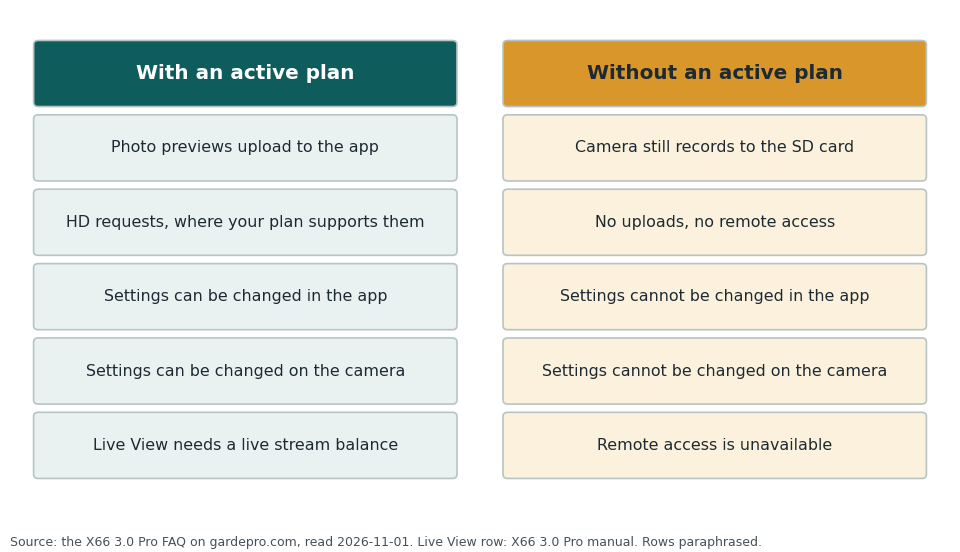
| Without a plan | "The camera can still capture photos and videos without an active data plan." It records to the SD card by its current settings. But without a valid plan you cannot change settings through the app or directly on the camera, and uploads and remote access are unavailable. |
| Your own SIM card | The X66 3.0 Pro manual says the camera "ONLY supports the pre-installed GardePro cellular SIM card" and works with no other. The cellular collection page lists one model under "Subscribe to Own SIM card Data Plan". |
| Several cameras | All cameras on an account share one data pool and one billing cycle. Extra cameras cost less per month. |
| AI features | The X66 3.0 Pro page says AI Tags and Smart Capture have "No extra AI subscription fees". You still need the cellular plan for uploads. |
The plan tiers and our 12-month math
GardePro's plan page (read 2026-11-01) lists three tiers for one camera. Plan prices can change, so check the page. The allowance resets each month. The page counts 500 photos as equal to 5,000 seconds of video preview, so one photo equals 10 seconds of preview.
| Tier | Monthly allowance | First camera, billed monthly | First camera, billed annually | Our 12 months, billed monthly |
|---|---|---|---|---|
| Basic | 500 photos, or 5,000 s video preview | $7 a month | $67.2 a year ($5.6 a month) | $7 x 12 = $84 |
| Standard | 1,500 photos, or 15,000 s video preview | $10 a month | $96 a year ($8 a month) | $10 x 12 = $120 |
| Premium | Unlimited photos or video preview | $15 a month | $144 a year ($12 a month) | $15 x 12 = $180 |
The last column is our multiplication, with the free first month not subtracted. Taking each annual price from that column gives $16.80 saved on Basic, $24 on Standard and $36 on Premium over a year (our subtraction). Annual plans also carry a yearly bonus of HD photos, HD video and Live Stream minutes, which the page values at $11, $22 and $38 by tier. HD photos, HD video and Live Stream can also be bought as add-ons. The page says these need an active plan, do not expire and are shared across your cameras. Add-on prices are on the plan page.
What a plan changes in how you use the camera
- You see previews, not full photos. The X66 3.0 Pro FAQ says by default the camera uploads "540P photos and Video Preview". The preview is a low-frame-rate, silent clip. HD photos and videos are requested from the app and depend on your plan.
- Upload timing is a battery choice. The manual lets you send on a schedule. It gives a 6, 12 or 24 hour interval as its examples. Its note on sending after each capture reads "Enabling it will significantly consume battery power due to frequent uploads." It adds "Set it to Off in most cases." The settings table marks Off in bold, and its header says bold means default. So the setup that puts every photo on your phone at once is also the one that drains fastest. A once-a-day schedule means you learn about a deer up to a day later.
- App settings are not instant. The manual says settings changed in the app take effect at the next transfer cycle. If you set a 24 hour cycle, a fix made today may not reach the camera until tomorrow.
- Smart Capture changes the allowance. On the X66 3.0 Pro the camera still records everything, but it uploads only the species you pick. That is how a Basic allowance can stretch. The math page shows the effect at your own photo count.
Questions to ask GardePro before you buy
- If I return the camera inside the 30 days, is the plan fee refunded? The refund policy we read covers products, not plans.
- What happens at the end of the free month if I do nothing? The FAQ tells us settings lock, but we did not find a page that says what the app shows.
- Can I cancel a monthly plan at any time? We found no cancellation terms on the plan page.
- Does the 2-month battery figure use the same send-on-every-capture setting the manual tells me to turn off?
- Will this camera's SIM get a signal where I will mount it? The X80 Pro page lists Verizon, AT&T and T-Mobile under "Cellular Network", and the carriers page says the camera searches for the strongest local LTE network. We found no coverage map. The manual says "Please ensure that the 4G signal is strong in the area where the camera is installed." GardePro's own troubleshooting guide says "Do not use the signal on your phone as the only test."
The cheaper or simpler option
Buying a cellular camera and skipping the plan is not a saving. By the maker's FAQ you lose the settings menu. The honest cheaper routes are these:
- A camera with no radio, such as the E5 2.0. No plan, no signal question. You read the SD card on site.
- A WiFi camera, such as the E6 2.0. The maker says you connect your phone to the camera's own WiFi, up to 165 ft, and not through a home router. That gets you the photos on a phone with no plan, but only when you are close.
If your mounting spot is far from the road and you have no signal there, these two are the right buy no matter what the plan costs.
See what each camera page asks of you
The links go to the pages we read. Our reason to click: the X66 3.0 Pro FAQ answers the no-plan question in plain words, and the E5 2.0 and E6 2.0 pages show the two ways to skip a plan.
We earn a small commission on qualifying sales, and 90% of it goes to charity (you can pick which); your price is unchanged. Full disclosure.
Sources, all read 2026-11-01
- GardePro cellular data plans, app for cellular cameras, supported networks
- Product pages: X66 3.0 Pro (FAQ), X80 Pro (FAQ), E6 2.0
- GardePro guide: why a cellular camera stopped sending pictures (dated 2026-10-05)
- X66 3.0 Pro instruction manual V1.0, from the manual page