This page is for someone new to sewing who is wondering whether an embroidery machine is a sensible first purchase. We read Baby Lock's embroidery model pages on 2026-11-01 (babylock.com): Aurora, Bloom, Flare, Vesta, Ursa, Capella and Venture 2. We did not read the other models in the categories. For the general buying questions, see our embroidery buying guide and what you need before the first stitch.
What the model pages say you get
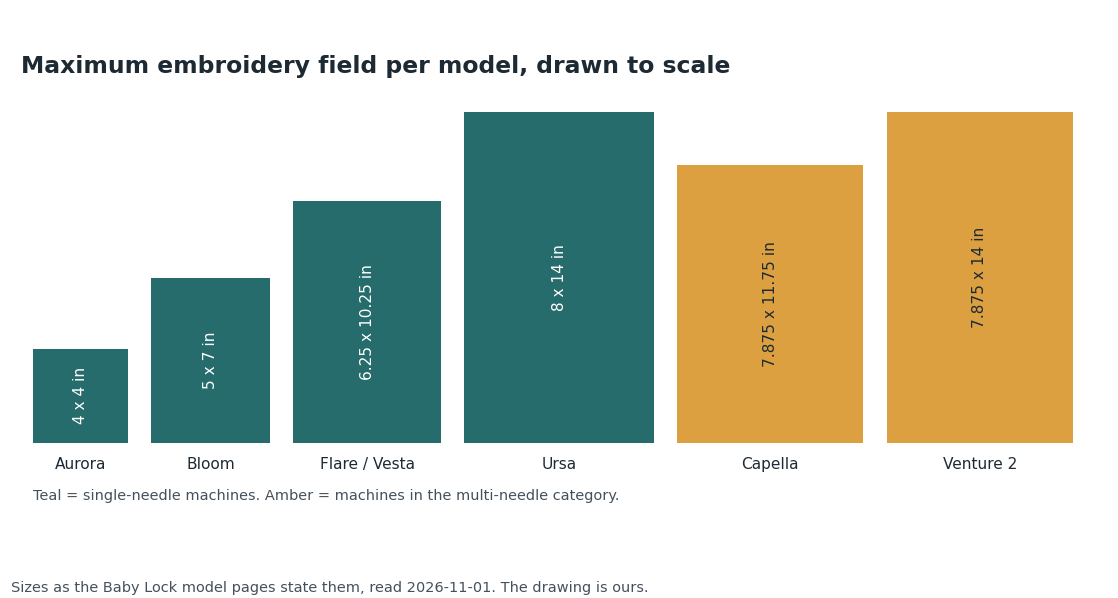
| Model | Embroidery field | Hoops in the box | Built-in designs | Built-in fonts | Stated speed |
|---|---|---|---|---|---|
| Aurora (sews too) | 4 x 4 in | 1 | 303 | 13 | 400 spm |
| Bloom | 5 x 7 in | 2 | 342 | 15 | 650 spm |
| Flare | 6.25 x 10.25 in | 2 | 293 | 14 | 850 spm |
| Vesta | 6.25 x 10.25 in | 2 | 293 | 14 | 850 spm |
| Ursa | 8 x 14 in | 2 | 914 | 23 | 850 spm |
| Capella (multi-needle category) | 7-7/8 x 11-3/4 in | 2 | 481 on the listing line, 175 on the spec line | not listed | 1000 spm |
| Venture 2 (10 needles) | 7-7/8 x 14 in | 4 | 120 on the listing line, 173 on the spec line | 65 | 1000 spm |
The Capella and Venture 2 pages disagree with themselves on design counts. We report both numbers and do not know which is right. Each of the seven pages lists .pes, .phc and .dst design files as readable; Venture 2 also lists .phx. The Aurora page describes itself as "the perfect machine to start your embroidery journey" and says it can send designs by Wi-Fi with Design Database Transfer. It has one USB port.
What you buy separately, per the maker's own lists
| Item | What the pages say |
|---|---|
| Bigger hoops | The Aurora page states one 4 x 4 in hoop included. Hoops are listed as separate products: the Vesta page lists a 6 x 6 in hoop, a 4 x 7 in continuous border hoop and a 5 x 7 in magnetic frame. The Flare and Bloom specs state two hoops included but not their sizes. The Bloom page also features a 5 x 12 in multi-position hoop, and we could not tell from the text whether it is one of the two in the box. |
| Stabilizer | Listed as its own product line: cut away, tear away, mesh, dissolve-away and fusible types, an embroidery topping and kits. The Aurora page lists a Stabilizer Trial Pack. We do not know which stabilizer suits which fabric from these pages. |
| Design software | Palette 11 Embroidery Software is listed as a compatible accessory on the Aurora, Bloom, Flare and Vesta pages. We could not read its product page (HTTP 406). The category page says "Purchase Ursa and get a free bundle of accessories, including a foot set, Design Suites software and more!" Check the date of any such offer. |
| Thread and needles | The site menu lists Klassé needles and Madeira, Wonderfil and Baby Lock thread under Notions. The model pages we read do not say what thread, if any, is in the box. |
| Extension table | Listed as an accessory for the Bloom and Vesta. |
| A class | The Aurora page lists "Getting to Know Your Baby Lock Aurora - Embroidery" as a connected class. The maker says retailers give a class with a machine bought from them. |
| Replacement hoops under the service plan | The Love of Sewing Membership exclusions name hoops and embroidery frames. |
For fit, the FAQ says: "Our latest Accessory Brochure provides details on machine compatibility." Check it before you add anything to a cart.
What the pages skip
- A full box contents list. The pages we read state hoop counts, and the Ursa page states two included feet.
- Any independent test of stitch quality or noise. Speeds are the maker's figures.
- Which stabilizer goes with which fabric, and how much a first project uses.
- The warranty (its page returned HTTP 406 to us) and the design software page.
- Prices. We quote none. The category page also carried a sale banner of uncertain date when we read it.
The cheaper or simpler option
You may not need an embroidery machine to try embroidery. A small first hoop, like the Aurora's 4 x 4 in field, limits what you can stitch, so check the design sizes you want. If your embroidery stitches pucker, read why machine embroidery puckers before blaming the machine. If your borrowed machine jams, fix that first: see thread nests under the fabric. An embroidery machine that also sews, like the Aurora as the maker lists it, is one way to avoid buying two machines. Whether it is better than a separate sewing machine is not something these pages can tell you.
See the embroidery machines on Baby Lock's own pages
Our reason to click: the Aurora page is where the maker lists its hoop count, built-in designs, file types and compatible hoops, stabilizers and software together.
We earn a small commission on qualifying sales, and 90% of it goes to charity (you can pick which); your price is unchanged. Full disclosure.
Sources
- Baby Lock model pages: babylock.com/machines/single-needle-embroidery/ followed by aurora, bloom, flare, vesta or ursa, and babylock.com/machines/multi-needle-embroidery/ followed by capella or venture-2 (store pages, shown as text so they are not links), read 2026-11-01.
- Baby Lock category pages: babylock.com/machines/single-needle-embroidery, /accessories/hoop-and-stabilizers, /accessories/software-and-upgrades (store pages, shown as text), read 2026-11-01.
- Baby Lock FAQs: babylock.com/faqs (store page, shown as text), read 2026-11-01.
- Baby Lock Palette 11 product page: HTTP 406 to our fetch on 2026-11-01. Not read.