Where the maker keeps its guides
These are page names on wiki.bambulab.com as of 2026-11-01. We read the P2S first-layer guide and the A1 series first-layer page in full. For the other lines we read only the page names and links, not the guides.
| Line | First-layer page | Clog pages | Bed pages |
|---|---|---|---|
| P2S | P2S First-Layer Printing Optimization Guide (/en/p2s/troubleshooting/first-layer-printing-optimization-guide) | P2S Clogging Troubleshooting; P2S Nozzle Unclogging Procedure; Hotend Clumping/Blob Cleaning Instructions | P2S Bed Tramming |
| A1 mini and A1 | A1 Series First Layer Print Issues (/en/a1-mini/troubleshooting/print-issues-troubleshooting) | A1 series nozzle clogging; extruder clogging; filament clogging | Manual bed tramming pages for each; heatbed not heating guides |
| A2L | First-layer quality calibration (/en/a2l/maintenance/first-layer-quality-calibration) | A2L clogging | A2L manual bed tramming |
| H2S, H2D, H2C | First-layer printing optimization guide, one per line (under /en/h2/, /en/h2c/, /en/h2s/) | Clogging, unclogging, TPU clogging, dual-extruder idler clogging | Manual bed leveling; toolhead scraping the build surface |
| X2D | First-layer printing optimization guide (/en/x2d/troubleshooting/first-layer-printing-optimization-guide) | X2D clogging | Homing and leveling failure |
| P1S | No first-layer page in the P1 troubleshooting list we read | The P1 page links a wiki page on avoiding nozzle clogs | P1 series heatbed not heating up |
What the P2S guide tells you, in order
The guide describes two failures. A first layer too low can scrape the plate and the nozzle, and makes the print hard to remove. A first layer too high leaves sparse lines and weak adhesion, and can lead to warping or spaghetti. It also says small defects, such as problems in about 10% of the layer while the rest is smooth, generally do not hurt the print.
Step zero is calibration: run Auto Bed Leveling and high-temperature bed leveling from "Setting > Calibration > Print Calibration", and again "If the printer has been moved, stored for a long time" or after the heatbed was replaced. You can also switch on Auto Bed Leveling in the send-print window.
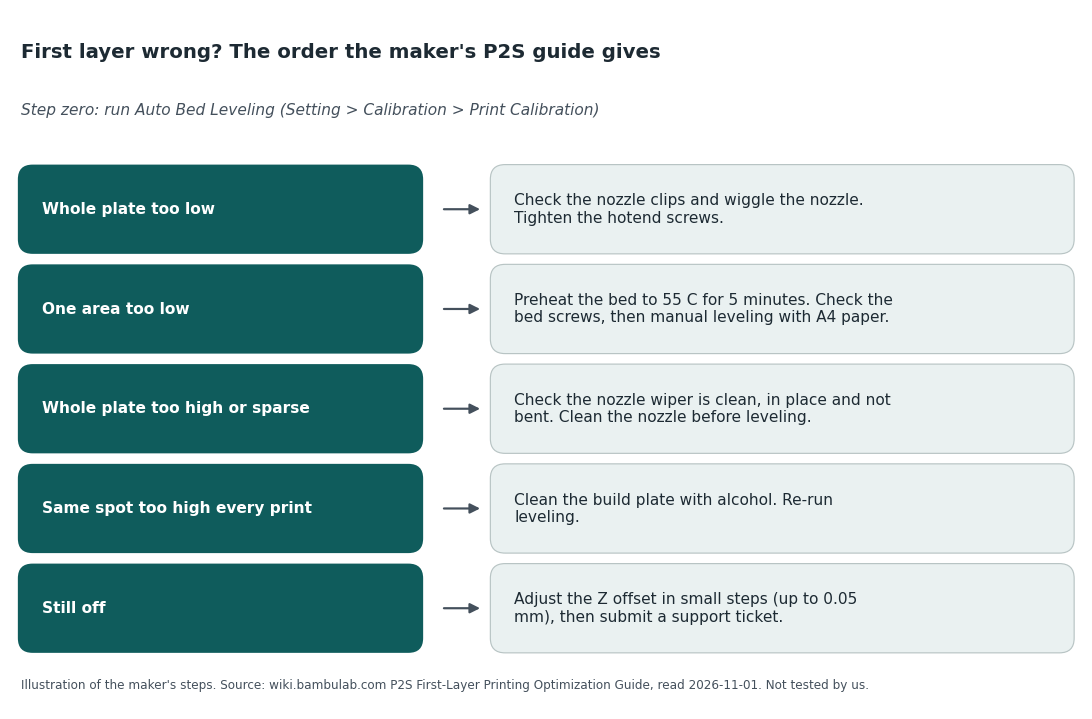
The manual-leveling step is the one to look at if you fear tuning. The guide has you run a leveling G-code file from a USB drive, then "Insert A4 paper between the nozzle and heatbed" at each of three corners and turn a screw until the paper drags slightly. It calls this advanced manual leveling for cases routine methods do not solve. For the Z offset it says to change it in small steps up to a stated limit, and to submit a technical ticket if the guide does not solve the problem.
The A1 series page
This page says to perform bed leveling before printing, especially after you change the PEI plate. If that is not enough, it has you remove the front cover and hotend, retighten small screws with H2.0 and H1.5 hex keys, and check the heater clip. It also offers a G-code offset edit and labels it a "quick temporary fix" that can create new defects elsewhere, with the advice to restore defaults afterward. Heed the screws warning on the page: they are small and easy to strip.
Side by side with our first-layer guide
| Topic | The maker's wiki | Our first-layer guide |
|---|---|---|
| Bed level vs Z offset | Calibration first, then a small Z offset change | Treats them as two separate problems |
| A dirty plate | Same spot too high every print: clean the plate with alcohol, then recalibrate | Has a section on cleaning the bed |
| What it is written from | Bambu's own hardware and firmware | General sources, not Bambu hardware. We did not test. |
What the sources do not say
- How often a new owner needs any of these pages. The wiki lists fixes, not rates.
- How the effort compares with other makers. We did not read rival troubleshooting pages for this guide.
- What the P1S does when its first layer is wrong. We found no first-layer page for it in the list we read.
- Whether the steps work. We have not run them.
If you would rather not do repairs
Know your exits before you order. The store's 30-day return rule is in our reading of the pages, with its conditions. A local print shop or makerspace removes the machine from the problem. A used printer may come with its own history of problems, so read our used-printer guide first. If a first layer fails on any printer, our first-printer problems guide says the fault is almost always in a few settings a beginner has not learned yet, not in the machine.
Read the manual before you order
Our reason to click: the A1 and P2S pages carry an Instruction tab beside the specs, so you can read the manual and the troubleshooting list described above before you decide.
We earn a small commission on qualifying sales, and 90% of it goes to charity (you can pick which); your price is unchanged. Full disclosure.
Sources
- Bambu Lab wiki: P2S First-Layer Printing Optimization Guide; A1 Series First Layer Print Issues; P2S, A1, A1 mini, A2L, H2, X2D and P1 troubleshooting lists. wiki.bambulab.com, read 2026-11-01.
- Bambu Lab US store A1 and P2S product pages (Instruction tab): us.store.bambulab.com, read 2026-11-01.