Which AMS goes with which printer
| Unit | Printers, per the maker | Drying | Other notes from its pages |
|---|---|---|---|
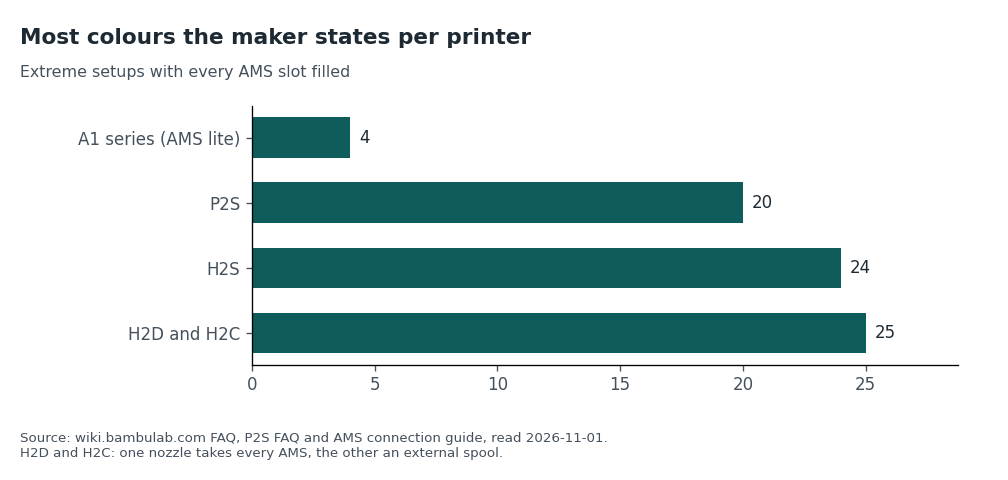
| AMS lite | A1 and A2 series, one unit per printer. The store says it is "not compatible with X, P and H2 series printers" | None listed on the page we read | Feeds filament straight to the toolhead, so no filament buffer. The wiki FAQ says the A1 series prints up to 4 colours with it |
| AMS 2 Pro | P2S, X2D and H2 lines. The wiki also lists it with the X1, P1 and A2L | Up to 65 °C. The store says it cannot dry some filaments completely | On the P2S, one unit can take its drying power from the printer. More units, or drying while printing, need the official power adapter |
| AMS HT | Listed in the wiki connection guide with the P2S and H2 lines | Up to 85 °C. The wiki says PVA, PPS-CF and PPA-CF may still not dry fully | Must be powered on its own cable; the printer cannot power its drying. The store says it cannot auto-feed TPU but works as a drying box |
For any AMS that is not the AMS lite, the wiki says "A filament buffer is required when connecting an AMS to a printer." The P2S Combo includes one. For the A1 mini the store FAQ says an AMS Hub accessory is needed to use the AMS, AMS 2 Pro or AMS HT. We did not read the H2 and X2D buffer pages and do not know what ships in each box beyond the lists in our box table.
What multi-colour printing costs you besides the unit
- Mixing materials. The wiki FAQ says ABS and PLA do not support mixed printing because of the large temperature difference between them.
- Waste. Colour changes use filament. We found no waste figure on the pages we read, so we give none. Your slicer will show an estimate for each model.
- Your own cost per print. Spool price × grams used ÷ 1,000. As an example with made-up inputs, not Bambu's price: a 1 kg spool that cost $20 and a 85 g part gives $20 × 85 ÷ 1,000 = $1.70 of filament. Our filament cost tool does this with your own numbers.
Drying and storage, from the wiki
The wiki says filament absorbs moisture, and that during printing the water turns to steam in the nozzle. It lists stringing, oozing, holes, a rough surface and reduced strength as results. Its rule is simple: if you are unsure how the filament was stored, it is "recommended to dry it first", and for daily storage "always keep it sealed and protected against moisture."
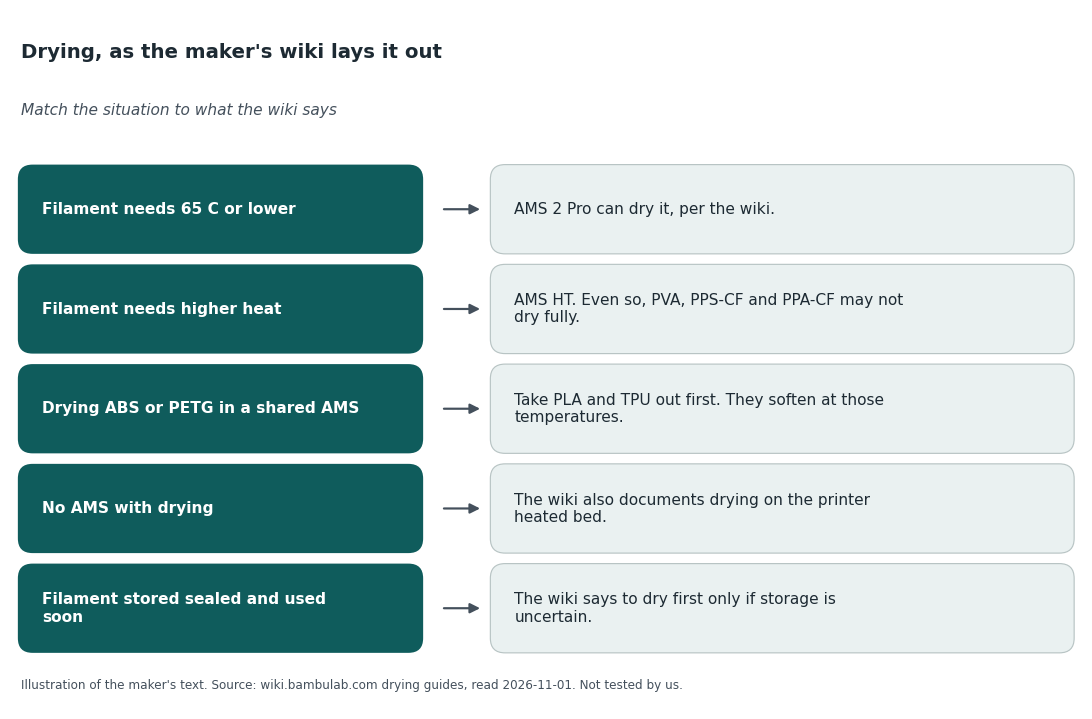
- Static drying. The wiki says static drying (leaving the filament in the AMS inlet) is not suitable for PLA, PVA, support for PLA or PETG, and TPU, because they soften at low temperature. It describes a rotating mode instead.
- Shared AMS. To dry ABS or PETG, take PLA and TPU out first. Drying PLA lets the other filaments stay.
- Drying while printing. The wiki says the temperature is lowered automatically after a print starts: 45 °C for PLA, 55 °C for PETG.
- No AMS drying unit. The wiki has a separate section on drying on the printer's heated bed. Read its cautions before trying it.
What the sources do not say
- How long a spool lasts open before it needs drying. The wiki gives no number for that that we would repeat.
- Whether third-party filament works as well. The store says the AMS 2 Pro uses RFID to match drying settings for Bambu's own filaments, and it does not say what happens with other brands.
- What an AMS adds to your first month. We found no measure of that on either.
The simpler option
Skip the AMS at first. Print single-colour PLA from the spool holder, which the wiki documents (it has a first-print page for the A1 with an external spool). Keep spools sealed, and pick a plastic from our filament types guide. A separate dry box is another way to store spools; search eBay for a filament dry box. Buy the AMS when you are sure you want colour.
If you want to look at the units
Our reason to click: each page states the unit's drying temperature, the printers it works with and the notes in its FAQ, so you can check the table above against the maker.
We earn a small commission on qualifying sales, and 90% of it goes to charity (you can pick which); your price is unchanged. Full disclosure.
Sources
- Bambu Lab wiki: Filament Drying Recommendations; AMS 2 Pro and AMS HT Media Drying Guide; Connection Guide for Multiple AMS Units with Different Printer Models; FAQ. wiki.bambulab.com, read 2026-11-01.
- Bambu Lab US store pages for AMS 2 Pro, AMS HT, AMS lite, A1 mini and P2S: us.store.bambulab.com/en/products/..., read 2026-11-01.